Skip to content

Point of sale for supermarkets, marts and retail shops

Run the counter, the stockroom and the credit book from one system.

TM POS gives your cashiers a fast barcode checkout and gives you stock, purchases, customer credit, cash and profit for every branch — clear enough to check at the end of every day.

  • Keeps selling when the internet drops
  • English and اردو
  • One shop or many branches
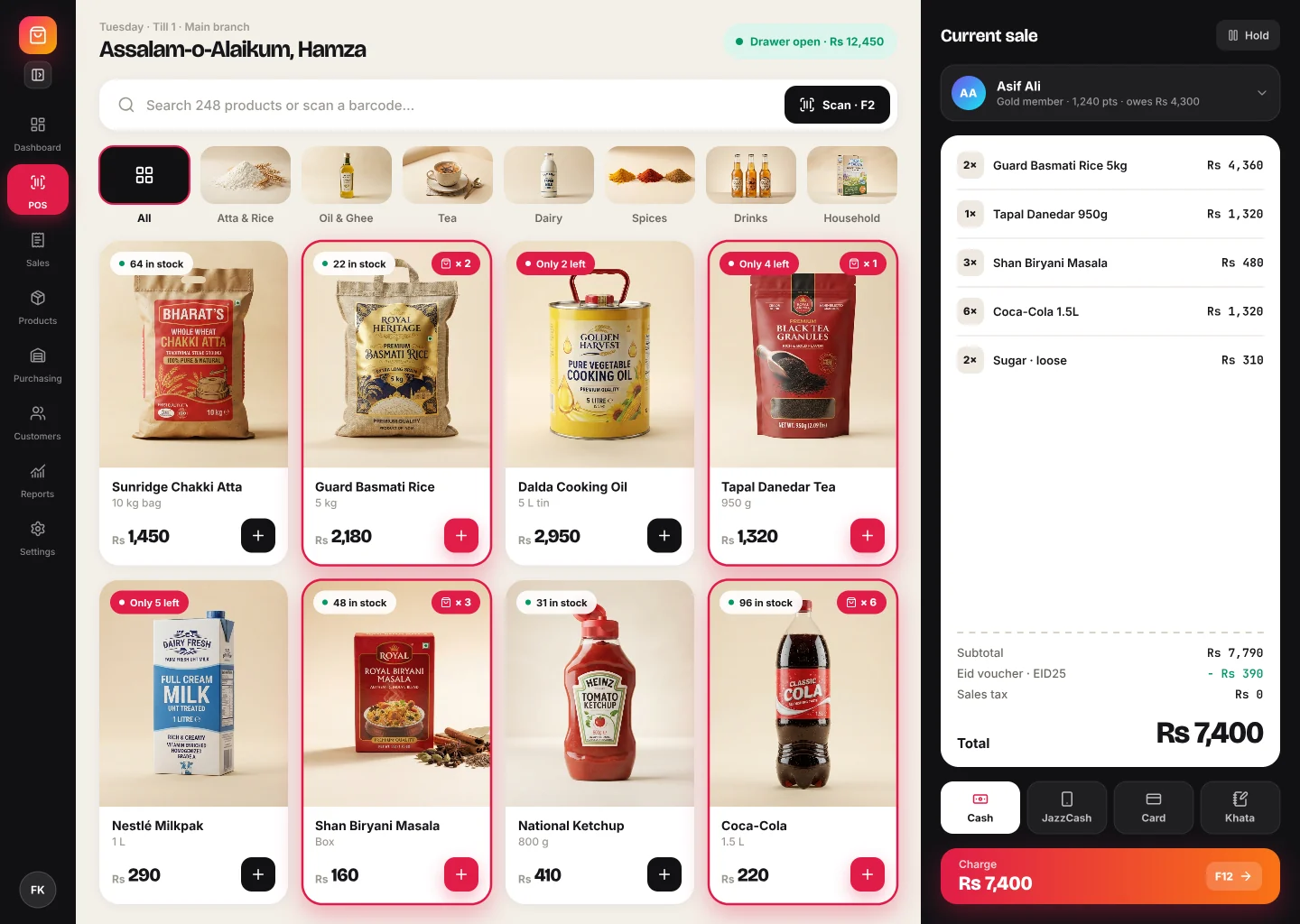
Example of the TM POS checkout screen
Saved and synced

Built for

Made for the way shops in Pakistan actually sell

Whatever you sell, one system covers the details your kind of shop depends on.

  • Supermarkets and marts

    Quick barcode checkout, thousands of products, and low-stock alerts before shelves run empty.

  • Wholesale

    Sell by carton, dozen or pack with their own prices, and track what each customer owes.

  • Pharmacies

    Every stock batch keeps its own expiry date, with warnings days before it expires.

  • Fashion and general retail

    Several barcodes per item, printed shelf labels, vouchers and bill discounts.

  • Restaurants and cafés

    Attach orders to dining tables and add a service fee to the bill.

Features

Everything a busy shop needs, from the first scan to the closing report

No separate apps for billing, stock and udhaar. Each part of TM POS feeds the others, so the numbers always agree.

Checkout

Fast, accurate checkout

Shorter queues and fewer billing mistakes. Cashiers scan, take payment and print — the system checks the maths.

  • Scan with any USB barcode scanner, or use the phone or laptop camera
  • Search by name, SKU or barcode, or tap a product by category
  • Sell loose items, cartons, dozens or packs, each with its own price
Customers & credit

Customers, udhaar and vouchers

Stop tracking credit in a notebook. See who owes what and when it is due.

  • Bilal TradersDue in 3 daysRs 42,500
  • Ayesha KiryanaOverdue by 6 daysRs 18,200
  • Hamza MedicalPart paidRs 7,950
Total outstandingRs 68,6502 due this week

Credit and vouchers: Business and Enterprise plans

Products

Products, barcodes and labels

Get your whole catalogue in quickly and find any item in seconds.

  • Import or update products from Excel or CSV, with row-by-row error reports
  • Several barcodes per product, or let TM POS generate one
  • Scan an unknown barcode to create the product with the code filled in
  • Print barcode labels straight to a Zebra label printer
  • Products and services, with or without stock tracking
  • Each product's sales, profit and stock history on one page

Inventory

Stock you can trust

Know what is on the shelf, what it cost you, and what is about to expire.

  • Stock is kept in batches, each with its own cost and expiry date
  • Choose FIFO, LIFO or latest-price costing for accurate profit
  • Low-stock alerts per product or a shop-wide default
  • Expiry warnings a set number of days ahead
  • Stock counts with a review and approval step, recording damaged, expired and lost goods
  • Keep selling when goods arrived but are not entered yet (optional)

Stock counts and editing batch expiry dates: Enterprise plan

Purchasing

Purchasing and suppliers

Every delivery is recorded and approved before it changes your stock.

  • Keep a list of your suppliers
  • Purchases move from draft to review to approved
  • Stock and cost prices update when a purchase is approved
  • Purchase reports for any period

Business and Enterprise plans

Sales & receipts

Sales, receipts and invoices

Every bill is searchable, printable and traceable to the cashier who made it.

  • Full sales history with filters by date, cashier and status
  • Thermal receipts printed directly to USB receipt printers, with your header and footer
  • A4 invoices for customers who need one
  • Cancel a sale with a reason; stock and voucher use are put back automatically
  • Cost and profit on every sale

Cash & payments

Cash drawer and payment methods

Close every shift knowing exactly how much cash should be in the drawer.

  • Cash, card, JazzCash, EasyPaisa, bank transfer and credit, ready to add
  • Open the drawer with opening cash; close it with expected versus counted cash
  • Optionally block sales until a drawer is opened
  • Sales summaries by payment method

Cash drawer: Business and Enterprise plans

Reports

Dashboard, reports and alerts

See how the day went in one glance, and dig in when something looks off.

  • Revenue, gross profit, number of sales, average sale and discounts given
  • Daily revenue chart, top products and sales by payment method
  • Sales, product, cashier and purchase reports for any period
  • Export reports to CSV, print them or save as PDF
  • Notifications for low stock, expiring stock and overdue credit

Detailed reports: Business and Enterprise plans

Team & control

Users, roles and an audit trail

Give every person the access their job needs, and nothing more.

  • Ready-made Admin and Cashier roles, or build your own from detailed permissions
  • Decide who can see cost prices, approve purchases or cancel sales
  • Hide cost prices behind a PIN at the counter
  • Every change and every sign-in is written to the audit log

Custom roles: Business and Enterprise. Cost-price PIN: Enterprise

Branches

Multiple branches, one catalogue

Open a new branch without setting up products and prices again.

  • Products and prices shared across branches
  • Separate stock, sales, cash drawers, purchases and counts per branch
  • Move stock between branches at cost
  • Choose which branches each user can work in, or view all at once

Up to 3 branches on Business, unlimited on Enterprise

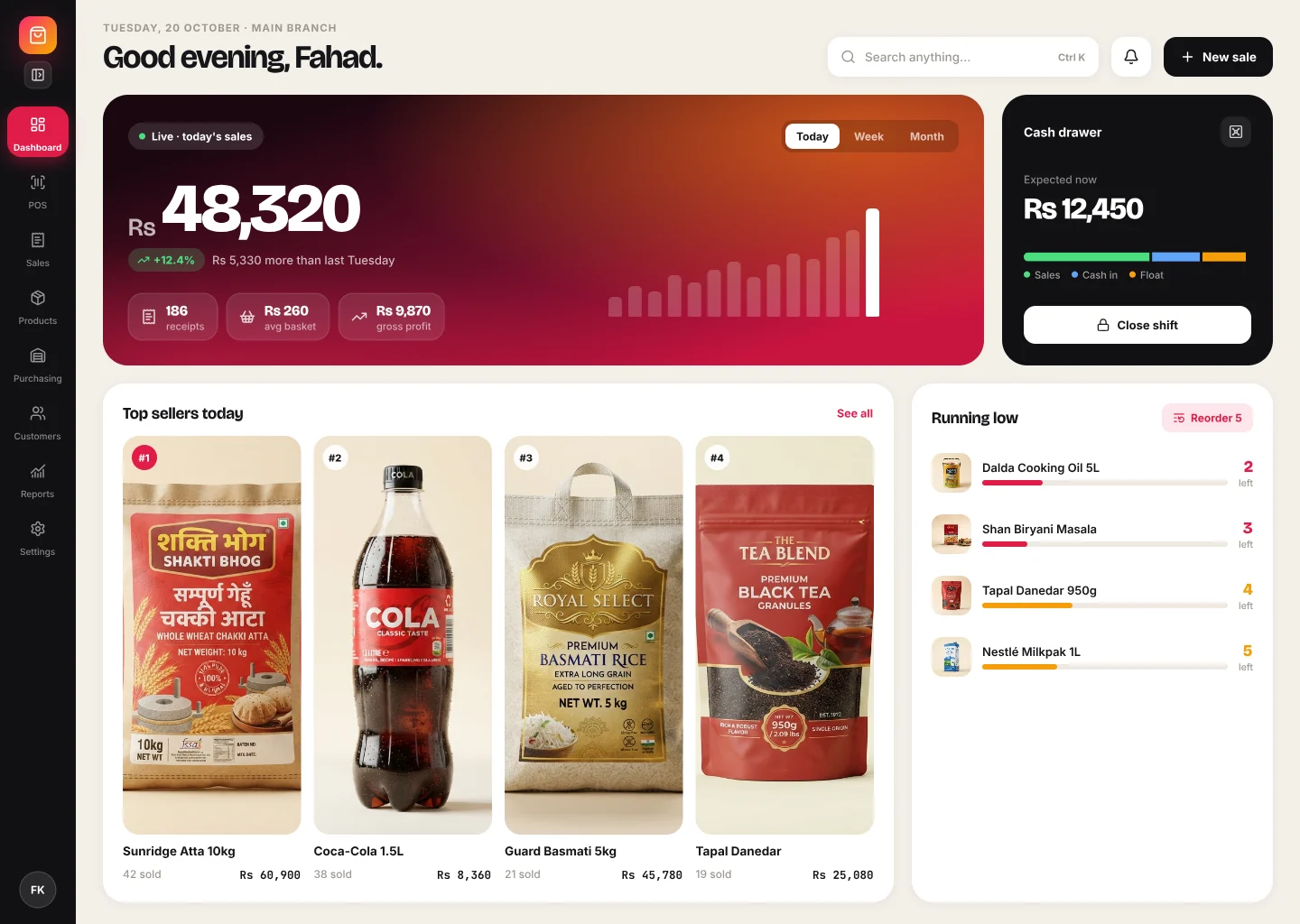
Dashboard

Your whole shop on one screen

The dashboard opens with today's numbers and what needs your attention. Switch branch or period and everything updates together.

Profit, not just sales
Gross profit comes from the actual cost of each stock batch sold.
Problems surface early
Low stock, expiring batches and overdue credit are listed before they cost you.
Uses your shop's time zone
Days and months close on your local time, wherever the server runs.
Example of the TM POS dashboard

Offline and hardware

Built for real counters

Internet drops, printers jam, cashiers change. TM POS is designed around what actually happens in a shop.

Keeps selling when the internet drops

  • Keeps selling offline

    The catalogue is saved on the device. Sales made without internet are queued and synced later, never duplicated.

  • Receipt printers

    Prints straight to USB thermal (ESC/POS) receipt printers, or through the normal print dialog.

  • Label printers

    Barcode labels go directly to Zebra and other ZPL label printers.

  • Scanners and cameras

    Works with standard USB barcode scanners, or the camera on a phone or laptop.

  • Browser or desktop app

    Use it in Chrome or Edge, or install the TM POS desktop app on Windows and macOS cashier PCs.

  • English and اردو

    Each user picks their language. Urdu screens are fully right-to-left.

How it works

Up and running in three steps

TM POS is set up for you by our team, so you start with a working shop instead of a blank screen.

Book a demo
  1. 01

    We create your shop

    Tell us about your business. We set up your shop on the right plan with a free trial, and send the owner's sign-in.

  2. 02

    Add products and your team

    Import your product list from Excel, add payment methods, connect your printer and invite your cashiers.

  3. 03

    Sell and stay in control

    Start billing at the counter. Check stock, credit and profit from the dashboard whenever you need.

Pricing

Simple monthly plans in Pakistani rupees

Every plan includes the full checkout, offline selling, barcode labels, receipts and the dashboard. Move up when your shop grows.

Starter

For a single counter getting started

PKR2,500/ month

14-day free trial

Users
2
Products
500
Sales per month
3,000
Branches
1

Highlights

  • Full POS checkout, online or offline
  • Barcode scanning and label printing
  • Customers, tax and bill discounts
  • Receipts, invoices and dashboard
Get started with Starter

Business

Best fit for growing marts

For growing marts with suppliers and credit customers

PKR6,000/ month

14-day free trial

Users
10
Products
5,000
Sales per month
Unlimited
Branches
3

Highlights

  • Everything in Starter
  • Purchasing and suppliers
  • Udhaar credit and vouchers
  • Cash drawer and detailed reports
  • Custom roles and up to 3 branches
Get started with Business

Enterprise

For chains and shops that need every control

PKR15,000/ month

30-day free trial

Users
Unlimited
Products
Unlimited
Sales per month
Unlimited
Branches
Unlimited

Highlights

  • Everything in Business
  • Stock counts with approval
  • Batch expiry management
  • Cost-price PIN and restaurant tables
  • No limits on users, products or branches
Get started with Enterprise

Prices are per shop, billed monthly. Your plan is set up and renewed by the TM POS team; online payment is not available yet.

Prices are being finalised and may change before launch.

Compare plans

FeatureStarterBusinessEnterprise
Limits
Users210Unlimited
Products5005,000Unlimited
Sales per month3,000UnlimitedUnlimited
Branches13Unlimited
In every plan
POS checkout with barcode and camera scanningIncludedIncludedIncluded
Offline selling with automatic syncIncludedIncludedIncluded
Multiple barcodes and label printingIncludedIncludedIncluded
Excel/CSV import and export, product images, selling unitsIncludedIncludedIncluded
Cash, card, wallet, bank and other payment methodsIncludedIncludedIncluded
Tax and bill discounts with a profit floorIncludedIncludedIncluded
Customer recordsIncludedIncludedIncluded
Thermal receipts, A4 invoices, sale cancellationIncludedIncludedIncluded
Dashboard and stock alertsIncludedIncludedIncluded
Audit logIncludedIncludedIncluded
English/Urdu, browser and desktop appIncludedIncludedIncluded
Business and up
Suppliers and purchasing with approvalNot includedIncludedIncluded
Udhaar credit sales and receivablesNot includedIncludedIncluded
Voucher codesNot includedIncludedIncluded
Cash drawer shiftsNot includedIncludedIncluded
Sales, product, cashier and purchase reportsNot includedIncludedIncluded
Custom roles and permissionsNot includedIncludedIncluded
Branches and stock transfersNot includedIncludedIncluded
Enterprise
Stock counts with approvalNot includedNot includedIncluded
Restaurant tablesNot includedNot includedIncluded
Edit expiry dates per stock batchNot includedNot includedIncluded
Hide cost prices behind a PINNot includedNot includedIncluded

FAQ

Questions shop owners ask

What happens if the internet goes down?

The checkout keeps working. Products and payment methods are saved on the device, and sales made offline are queued and sent to the server when the connection returns. Each sale carries its own reference, so a retry never creates a duplicate.

What hardware do I need?

A computer or tablet with Chrome or Edge is enough. For a full counter add a USB barcode scanner, a USB thermal receipt printer and, if you print shelf labels, a Zebra or other ZPL label printer. Windows and macOS PCs can also use the TM POS desktop app.

Can my staff use it in Urdu?

Yes. Every screen is available in English and Urdu, and each user can choose their own language. Urdu is shown right-to-left.

How do I sign up? Is there a free trial?

Contact us using the form below. Our team creates your shop on the plan you choose and starts the free trial: 14 days on Starter and Business, 30 days on Enterprise. You receive the owner's sign-in and can invite your team.

How do I pay, upgrade or renew?

Plans are billed monthly in PKR. Payment is arranged directly with the TM POS team, who record it and renew your plan. You can see your plan, limits and renewal date under Settings → Plan. Online payment is not available yet.

What happens when I reach a plan limit?

Your existing data stays safe. TM POS simply asks you to upgrade before adding more than your plan allows — for example a new user, product or branch.

Can I bring my existing products?

Yes. Download the Excel or CSV template, fill in your products and import the file. Rows with an existing SKU update that product, and any rows with problems are listed so you can fix them. If you used the earlier TM POS, our team can move your data across.

Can I process returns?

You can cancel a whole sale with a reason; the stock and any voucher use are put back automatically. Returning part of a sale is not available yet.

Is my shop's data private?

Each shop's data is kept separate from every other shop. Users sign in with their own accounts and only see what their role allows, and every change is recorded in the audit log.

Contact

Book a demo or ask a question

Tell us a little about your shop. We will show you TM POS with your kind of products and help you choose a plan.

Plan you are interested in

Required. Your details go straight to our team through WhatsApp or email. This website does not store them.